Drive Zone Online Map Locations
Open-world driving games become more exciting when the map offers different environments to explore. Drive Zone Online is known for its large open map, where players can drive freely, drift, race, and explore various locations.
In this Drive Zone Online map locations guide, you will learn about the main areas of the game world, what you can do in each location, and how these places help you improve your gameplay experience.
Whether you want to practice drifting, explore highways, or simply enjoy free driving, understanding the map can make your gameplay much better.
What Is the Map in Drive Zone Online?
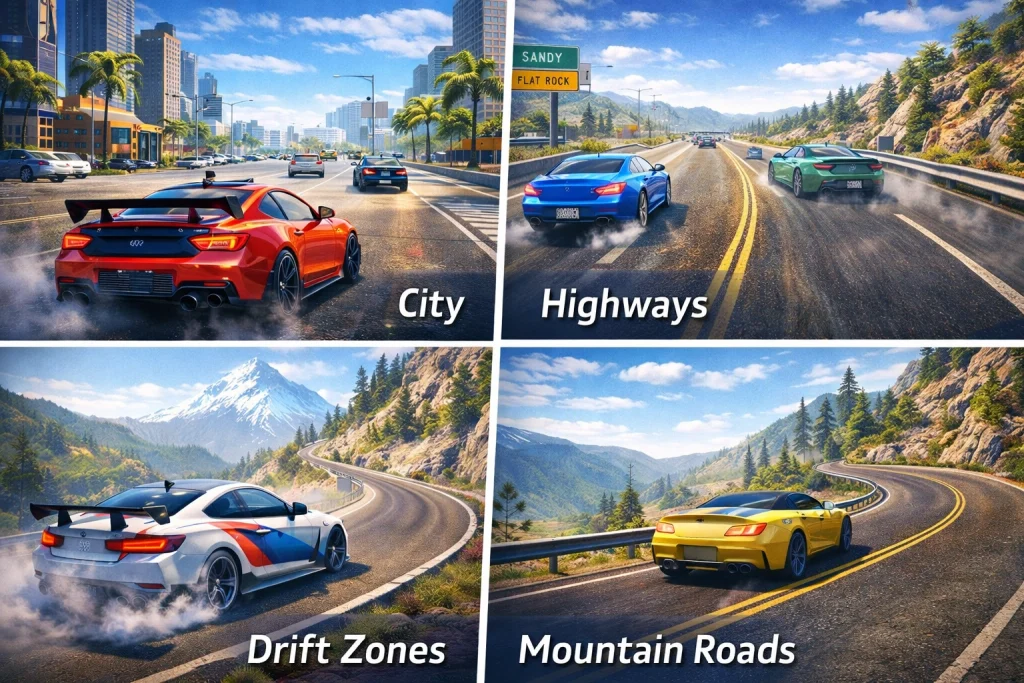
The map in Drive Zone Online is designed as a large open-world environment where players can drive without strict restrictions. Instead of following a single race track, the game allows you to explore multiple areas such as highways, cities, and drift zones.
Key characteristics of the map include:
- Large open roads for free driving
- Different terrains and road types
- Multiple exploration areas
- Locations suitable for drifting and racing
- Online interaction with other players
This open design is one of the reasons why many players enjoy the drive zone simulator experience.
If you are new to the game and want to understand the basics first, you can read our complete guide on how to play Drive Zone Online to learn the controls, game modes, and starting tips.
Main Map Locations in Drive Zone Online
Below are some of the most common areas players encounter while exploring the map.
1. City Area
The city area is one of the busiest locations in the game. It contains multiple roads, intersections, and urban scenery.
Features of the city map:
- Dense road networks
- Traffic-style driving environments
- Good location for cruising with friends
- Urban-style buildings and lighting
Many players use the city zone for drive zone free play, where they can simply drive around and test different cars.
2. Highway Zones
Highways are perfect for players who enjoy high-speed driving.
What makes highways special:
- Long straight roads
- Ideal for testing maximum speed
- Minimal turns compared to city roads
- Great for racing other online players
If you want to test the performance of different vehicles, highways are one of the best map locations.
Choosing the right vehicle also matters. Some cars perform much better on high-speed roads, so you may want to check this list of the top 10 Drive Zone Online cars before starting your highway runs.
3. Drift Areas
Drift zones are popular locations for players who want to practice drifting techniques.
These areas typically include:
- Wide corners
- Curved mountain roads
- Smooth asphalt surfaces
- Open spaces for controlled drifting
Drifting in these locations can help you improve car control and driving skills.
Players often choose these areas when practicing advanced driving techniques in the drive zone simulator environment.
4. Mountain Roads
Mountain roads offer a completely different driving experience compared to highways.
Characteristics include:
- Sharp turns
- Elevation changes
- Scenic driving routes
- Challenging corners
These roads are perfect for players who want a more technical driving experience.
5. Open Parking Areas
Parking areas and open lots provide wide spaces for:
- Practicing car control
- Performing drift circles
- Testing acceleration and braking
- Meeting other online players
These locations are also commonly used when playing with friends.
If you want to explore the map together with other players, you can read our step-by-step guide on how to play Drive Zone Online with friends to learn how multiplayer sessions work.
Map Activities You Can Do
Exploring the map is not just about driving randomly. Many activities are possible across different locations.
Popular map activities include:
- Free roaming
- Car drifting practice
- Highway speed testing
- Multiplayer cruising
- Car meetups with other players
These activities make the map feel alive and interactive.
Tips for Exploring Drive Zone Online Maps
Understanding how to use the map effectively can improve your gameplay.
Use Free Drive Mode
Free drive mode allows you to explore without race restrictions. It is perfect for learning the map layout.
Practice in Open Areas First
If you are new to the game, start with wide open areas before trying mountain roads or drift zones.
Choose the Right Car
Different cars perform better in different environments.
- Drift cars for curved roads
- Fast cars for highways
- Balanced cars for city driving
Learn the Map Layout
Spend some time exploring each location slowly. Over time, you will learn shortcuts, drift spots, and the best areas for speed testing.
Drive Zone Online Map Overview
| Map Area | Best Activity | Difficulty Level |
|---|---|---|
| City Area | Free driving and cruising | Easy |
| Highways | Speed testing | Easy |
| Drift Zones | Drifting practice | Medium |
| Mountain Roads | Skill driving | Hard |
| Parking Areas | Car control practice | Easy |
Can You Play Drive Zone Online Offline?
Many players ask if the game supports offline mode.
While some drive zone free play features allow solo driving, most map interactions work best when connected online, especially when you want to see other players in the world.
Final Thoughts
Understanding the different map locations in Drive Zone Online can greatly improve your gameplay experience. Each area offers a different driving style, from fast highways to technical mountain roads and open drift zones.
Instead of staying in one place, try exploring the entire map. You will discover new driving spots, meet other players, and improve your driving skills.
If you enjoy open-world driving games, the diverse environments in Drive Zone Online make it a fun platform for exploration, drifting, and multiplayer driving.